 Battery Drain Insights
See what is draining your Mac battery. In plain words.
Your MacBook loses charge faster than it should, and the battery menu names nothing. Battery Drain Insights ranks the background programs and apps that did the work since you unplugged. It also reports what kept your Mac awake while the lid was closed.
Battery Drain Insights app for Mac laptops macOS 12 or later, Apple silicon and Intel Never connects to the internet Interface in English
What is draining my MacBook battery?
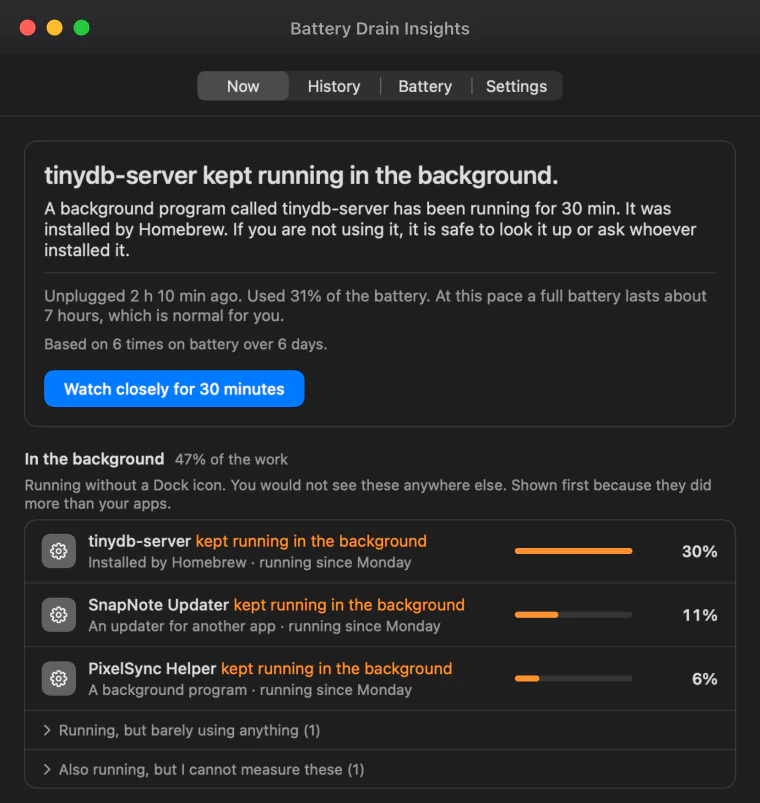
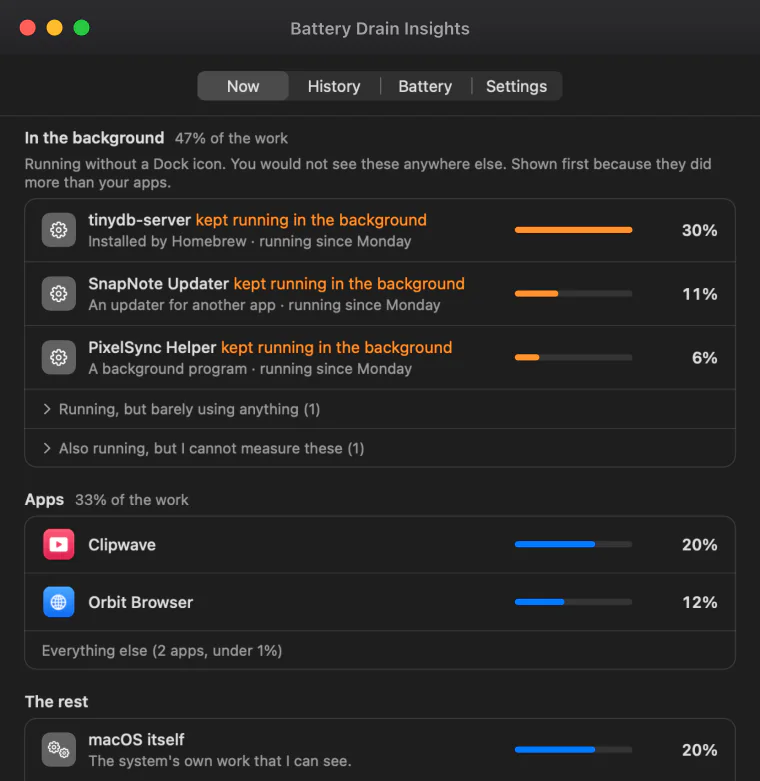
Most often it is something you cannot see. Programs with no window and no Dock icon keep working after you unplug: updaters, helpers that apps leave behind, a database or local server you installed once. Battery Drain Insights lists them first, ranked by how much work each did, whenever they did more than your apps.
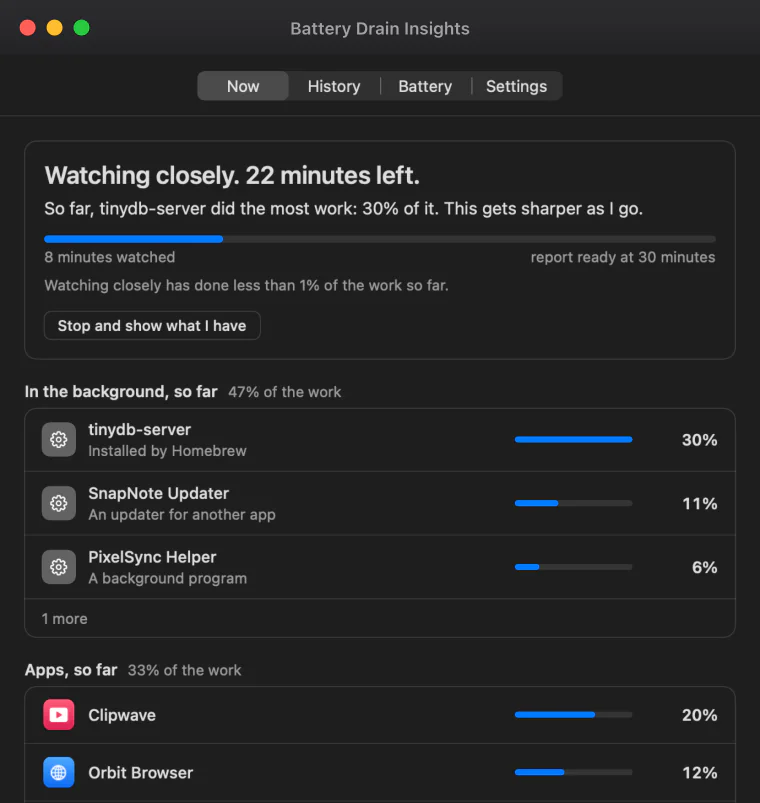
Unplug, work as usual, then open the window. The first line is the answer: how long ago you unplugged, how much charge is gone, and how long a full battery lasts at this pace.
Under it are two lists. In the background holds the programs you would not find anywhere else. Apps holds the ones you opened. Each row shows its share of the work.
When something stands out, the app says so in one sentence:
- A background program kept running the whole time
- An app worked hard while the battery dropped fast
- An app kept working while you were not using your Mac
- An app kept your Mac awake
- An old Intel version of an app is running, which costs extra battery
Why does a MacBook lose charge with the lid closed?
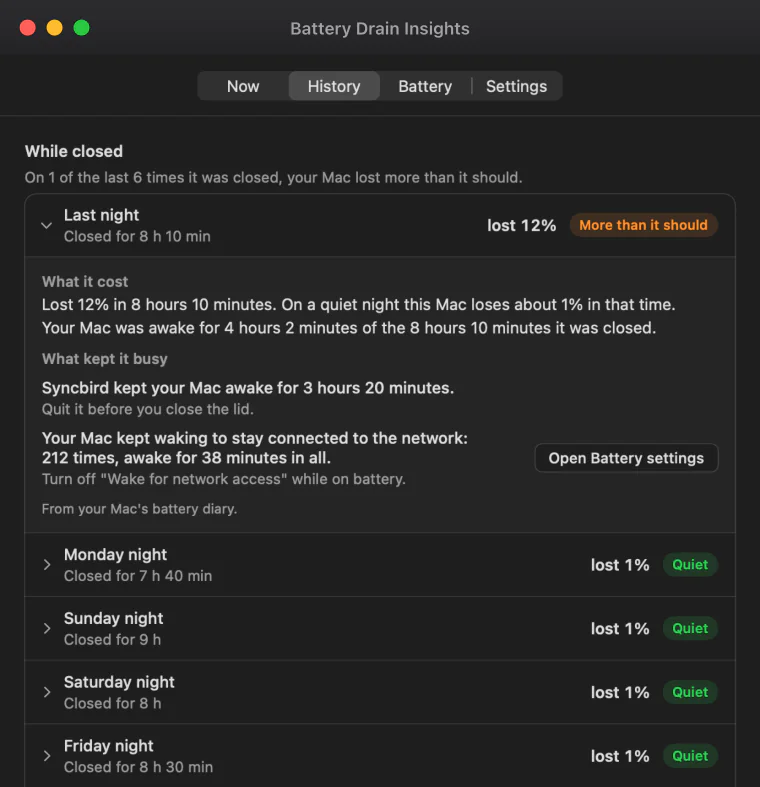
A closed Mac should lose very little overnight. When it loses more, it was awake part of the time: an app held it awake, or it kept waking to stay connected to the network. Battery Drain Insights shows each closed stretch, how long your Mac was really awake, and what woke it when that can be told.
With your one-time permission the app reads the power log that macOS keeps. So on the first day it can already show the last two weeks, every night included.
Each stretch says how much charge it cost, compared with the quiet nights on your own Mac. A night that cost too much is marked. Open it to see the cause and what to change.
The guide goes further into why a Mac drains while it sleeps.
What can you do about it?
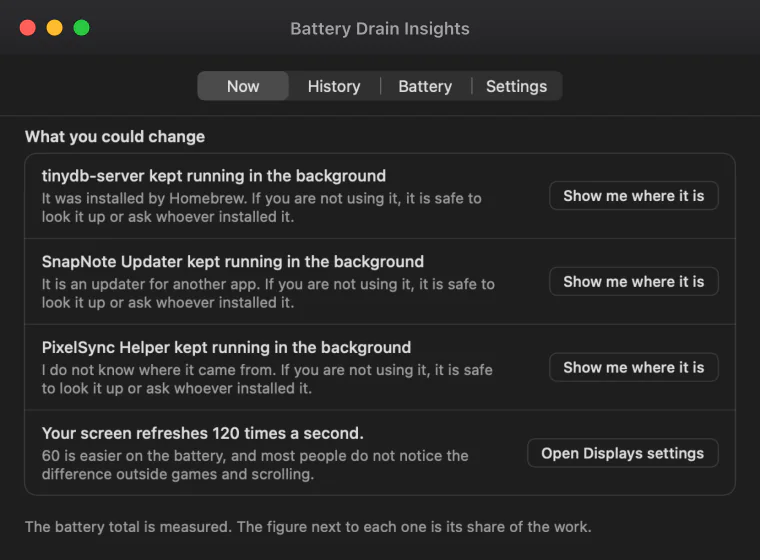
Every finding comes with a plain suggestion and, where the app can take you there, a button. It opens Login Items, Battery settings or Displays settings, or shows the program's file in Finder. You decide what to remove or switch off. The app does not quit, delete or change anything by itself.
For each background program the advice says what the app knows about where it came from, such as Homebrew or another app's updater, so you can judge whether you still need it.
Settings count too. A screen that refreshes 120 times a second, Low Power Mode being off, or your Mac waking for network access while closed are listed with the button that opens the right page.
How long until you get an answer?
A first picture takes about 15 minutes on battery. After a few days the app knows what is normal for your Mac and can say when something uses more than usual. If you want an answer sooner, Watch closely looks every two seconds for 30 minutes and gives a first rough answer after about two minutes.
Watching closely also catches programs that start and stop within seconds, which a look every 30 seconds can miss. It uses more battery while it runs, so it is offered and never starts by itself. It ends with a report that says what the watching used.
On the charger the app rests. It says Unplug and I start measuring, and can show the last time you were on battery.
How worn is your MacBook's battery?
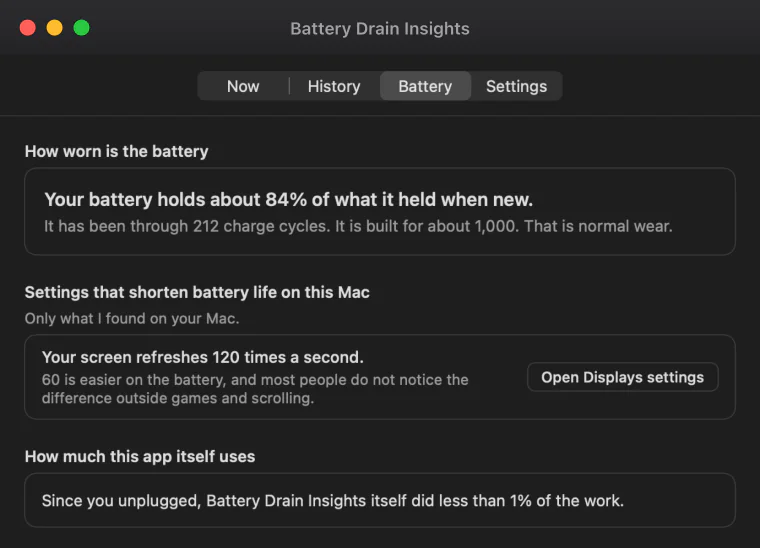
The Battery tab says in one sentence how much your battery still holds compared with new and how many charge cycles it has been through. If macOS says the battery needs service, the app repeats it. It also lists settings on your Mac that shorten battery life, such as a screen that refreshes 120 times a second.
Apple designs MacBook batteries to keep up to 80% of their original capacity at their maximum cycle count, which is 1,000 cycles on most recent models (Apple, Determine battery cycle count for Mac laptops). Below that, every charge is clearly shorter, whatever your apps do.
The same tab shows how much of the work Battery Drain Insights itself did since you unplugged, so you can check what the watching costs.
How is it different from Activity Monitor and the battery menu?
macOS has the raw figures in several places. The battery menu names apps only at the moment you look. Activity Monitor lists everything by its technical name. The power log needs Terminal. Battery Drain Insights keeps watching while you work, adds it up, and tells you in a sentence what stood out and what to do.
| Where you look | Background programs with no Dock icon | The night with the lid closed | Says what to do | How far back |
|---|---|---|---|---|
| Battery Drain Insights | Listed first, by share of the work | Each stretch, with the cause when it can be told | Yes, with a button where possible | 30 days |
| The battery menu, "Using Significant Energy" | Apps only, and only right now | No | No | This moment |
| Activity Monitor, Energy tab | Yes, among everything else, under technical names | No | No | An average of the last 12 hours |
| System Settings, Battery | No | The charge level over time, without the cause | No | 24 hours and 10 days |
Terminal, pmset -g log | No | Yes, as a raw log to read line by line | No | About two weeks |
The steps for each built-in tool are in the guide: Why is my MacBook battery draining so fast?
What can it not do?
It cannot show a battery percentage per app. macOS does not give that figure to an app from the App Store, so the number beside each name is its share of the work, measured from processor time. The battery total at the top is the real reading. The app shows the cause and leaves the fixing to you.
- Battery percentage per app
- Not available to App Store apps. You see each program's share of the work instead, and the app says so on screen.
- Quitting or removing programs
- The app shows where a program is and opens the right settings page. It changes nothing by itself.
- An instant answer
- It learns by watching: about 15 minutes on battery for a first picture, a few days to know what is normal for your Mac.
- Programs run by the system
- They are listed and marked as not measured. macOS lets the app see that they are there, not how hard they work.
- A Mac without a battery
- On an iMac, Mac mini, Mac Studio or Mac Pro there is nothing to watch, and the app says so.
- Other languages
- The interface is in English.
What happens to your data?
Nothing leaves your Mac. The app has no internet connection, no account and no analytics. What it records is kept on your Mac for 30 days and can be erased at any time. The only thing that can ever leave is an email you send yourself when you ask for help.
The app is built only from Apple's own frameworks, with no code from any other company inside it. The details are on the privacy page.
Frequently asked questions
Why is my MacBook battery draining so fast?
The usual causes are a background program or an app working hard, a bright or fast-refreshing screen, an app that keeps the Mac awake, or a worn battery. Battery Drain Insights ranks the programs by the work they did since you unplugged, so you can see which of these it is on your Mac.
How do I see battery usage by app on a Mac?
macOS shows it in two places: the battery menu lists apps using significant energy right now, and Activity Monitor has an Energy tab. Neither keeps a record you can act on. Battery Drain Insights lists every app and background program with its share of the work for the whole time on battery.
Why does my MacBook battery drain overnight when it is closed?
Because it was not asleep the whole night. An app can hold a Mac awake, and a Mac can wake by itself again and again to stay connected to the network. Battery Drain Insights reads the power log macOS keeps and shows, for each night, how long the Mac was awake and what woke it when that can be told.
Why does the battery menu say "No Apps Using Significant Energy" while the battery keeps draining?
The menu shows only what is using a lot of energy at the moment you open it. Something that worked hard ten minutes ago, or several small background programs that add up, does not appear. Battery Drain Insights adds up the work over the whole time on battery, background programs included.
Does Battery Drain Insights show the battery percentage each app used?
No. macOS does not give that figure to apps from the App Store. The app shows each program's share of the work, measured from processor time, next to the real battery total. A program with 30% of the work did about a third of what your Mac's processor was asked to do.
Can it fix the battery drain for me?
No, and it does not try. It shows what is using the battery and opens the place where you can change it: Login Items, Battery settings, Displays settings, or the program's file in Finder. What to remove or switch off stays your decision.
How long does it take to get an answer?
A first picture takes about 15 minutes on battery. After a few days the app knows what is normal for your Mac. For a faster answer, Watch closely looks every two seconds for 30 minutes and gives a first rough answer after about two minutes.
Will the app itself drain my battery?
It is built to use very little. It looks every 30 seconds while you are on battery and rests on the charger. The Battery tab shows how much of the work the app itself did, so you can check. Watching closely uses more while it runs, and its report says how much.
Does it need any special permission?
One, and it is optional. If you allow it, the app reads the power log macOS keeps, which lets it show the last two weeks and the nights with the lid closed. It only reads the log, and you can stop this at any time in Settings. Notifications are optional too.
Does it work on Apple silicon and Intel Macs?
Yes. Battery Drain Insights runs on macOS 12 or later, on Apple silicon and Intel MacBook models. It needs a Mac with a built-in battery. On a desktop Mac the app opens and says there is no battery to watch.
Does Battery Drain Insights collect my data?
No. The app never connects to the internet and there is no account. What it records stays on your Mac, is deleted after 30 days, and can be erased at any time.
Is the app available in other languages?
The interface is in English. This website also has a page in Simplified Chinese.
Sources
- Apple, View energy consumption in Activity Monitor on Mac, on Energy Impact and the 12 hour average
- Apple, Determine battery cycle count for Mac laptops, on cycle limits and the 80% design figure
- Apple, Check the condition of your Mac laptop's battery, on Battery Health and Service Recommended
- Apple, If your Mac sleeps or wakes unexpectedly, on what wakes a sleeping Mac
Find out what is using your battery
Battery Drain Insights is a Mac app for MacBook laptops (macOS 12 or later, Apple silicon and Intel) that shows what is draining the battery in plain words: which background programs and apps did the most work since you unplugged, what kept the Mac awake while its lid was closed, and how worn the battery is. It never connects to the internet. Nothing is collected, and there are no ads and no account.
Get Battery Drain Insights on the Mac App Store