 Battery Drain Insights
Why is my MacBook battery draining so fast?
Written by devhoku, the developers of Battery Drain Insights.
A MacBook battery that drains fast is usually losing charge to one of five things: a background program that never stops, one heavy app or browser tab, the screen, a Mac that does not stay asleep when closed, or a battery that has worn out. Each leaves a different trace, and macOS can show you most of them.
Applies to MacBook Air and MacBook Pro macOS 12 and later Tools needed none, all checks use macOS itself
What are the common causes of fast battery drain on a Mac?
The cause people miss is software that keeps working, because much of it has no window. The screen adds to it on every Mac, and a worn battery makes everything else look worse. The table lists each cause with the sign that gives it away and what to do.
| Cause | The sign | What to do |
|---|---|---|
| A background program that never stops | The Mac is warm or the fan runs with nothing open, and the drain goes on after you quit every app | Find it in Activity Monitor or in Login Items & Extensions, and decide whether you still need it |
| One app or browser tab working hard | The drain is fast only while that app or tab is open | Close the tab or quit the app, and check whether an update is waiting |
| The screen | Brightness near full, or a display that refreshes 120 times a second | Lower the brightness. On battery, set the refresh rate to 60 Hertz in Displays settings |
| Indexing after an update | Fast drain for some hours up to a day or two after a macOS update, then it stops by itself | Leave the Mac plugged in until it finishes |
| An Intel version of an app on an Apple silicon Mac | Activity Monitor shows Intel in the Kind column for that app | Install the Apple silicon version if the developer offers one |
| A Mac that does not stay asleep | The charge drops overnight with the lid closed | Find what woke it or held it awake, as described below |
| A worn battery | Every charge is short whatever you do, and Battery Health says Service Recommended | Battery service, see below |
How do I check what is using the battery on my Mac?
Start with the battery menu, then Activity Monitor's Energy tab, then the battery charts in System Settings. Together they show which apps are working now, which worked most over the last 12 hours, and whether the charge fell while the screen was on or off. Each takes under a minute.
- Look at the battery menu. Click the battery icon in the menu bar. Under Using Significant Energy, macOS names the apps that are using a lot at this moment. If it says No Apps Using Significant Energy, go on to the next step: the menu only knows about right now.
- Open Activity Monitor and click Energy. Activity Monitor is in Applications, Utilities. Click the Energy tab and sort by the 12 hr Power column, which is the average over the last 12 hours. Choose View, All Processes to include every background program.
- Read the battery charts in System Settings. Open System Settings, Battery. The charts show the last 24 hours and the last 10 days. A steep fall while the screen was on points to an app. A steep fall while the screen was off points to the time your Mac was closed.
- Check what is allowed to run in the background. Open System Settings, General, Login Items & Extensions. Under Allow in the Background are the programs that may keep working when their app is closed. Switch off the ones you do not recognise or no longer need.
- For a closed Mac, read the power log. Open Terminal and type pmset -g log, then press Return. Each line with Wake or DarkWake ends with the reason. A long run of wakes a few minutes apart through the night is what to look for. The command pmset -g assertions shows what is keeping your Mac awake right now.
On macOS 12 the names differ a little: the charts are in System Preferences, Battery, Usage History, and login items are under Users & Groups. The two Terminal commands only read. They change nothing on your Mac.
What does Energy Impact mean in Activity Monitor?
Energy Impact is a relative measure of how much energy an app is using right now, and lower is better. It has no unit and it is not a percentage of your battery. The 12 hr Power column is the average of the same measure over the last 12 hours, and it appears on Mac laptops only.
That is Apple's own description (View energy consumption in Activity Monitor on Mac). It explains two common puzzles. An app with an Energy Impact of 80 is not using 80% of anything: the figure only ranks apps against each other. And an app can sit at the top of the list for a minute while a quiet background program, far down the list, uses more over a whole afternoon.
Why is my MacBook battery draining while it is closed?
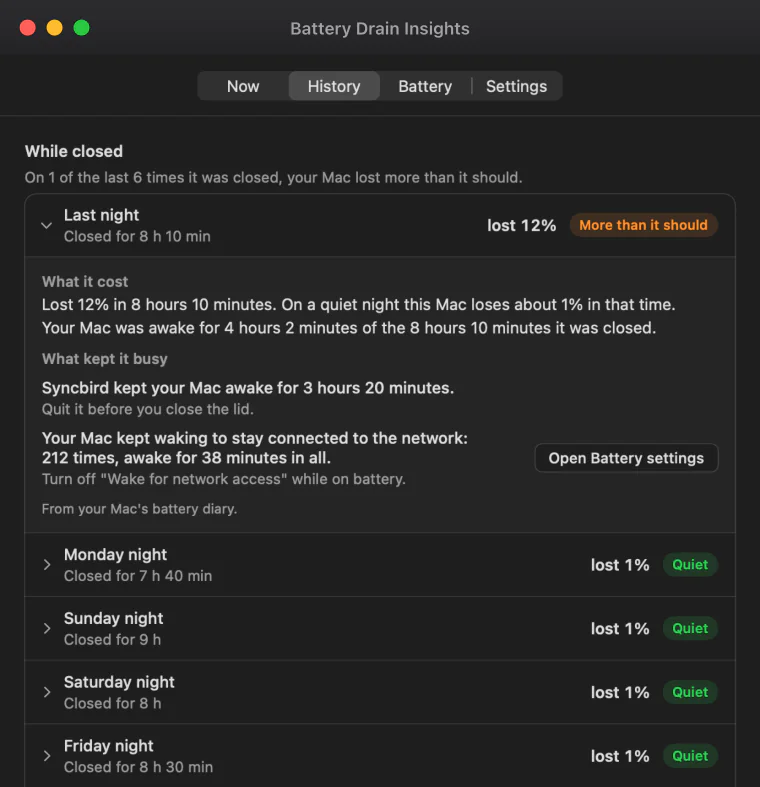
A sleeping Mac still wakes for a few seconds now and then to check the network and keep Bluetooth devices connected. Those short wakes cost almost nothing. The battery drains when they come hundreds of times a night, or when an app holds the Mac fully awake behind the closed lid.
Four things are worth checking, in this order:
- Wake for network access. In System Settings, Battery, Options, set it to Never or to Only on Power Adapter. It is a common reason for a night of repeated short wakes (Apple, Set sleep and wake settings for your Mac).
- An app that prevents sleep. Video calls, players, backups, file sync and
downloads can ask macOS to stay awake. Quit them before you close the lid. In
Terminal,
pmset -g assertionsnames what is holding your Mac awake at that moment. - Things plugged in or paired. A drive, a display, a hub or a Bluetooth accessory can wake a Mac. Close the lid once with everything disconnected and compare the night.
- The power log.
pmset -g loglists every sleep and wake of about the last two weeks, each with a reason. It is long and written for engineers, and it is where the answer is.
Apple covers the general case in If your Mac sleeps or wakes unexpectedly.
Why is my MacBook battery draining fast after an update?
After a macOS update the Mac rebuilds its search index and sorts through photos and files again. That work can drain the battery faster for some hours, and sometimes for a day or two, and then it stops by itself. Leaving the Mac plugged in and awake overnight lets it finish sooner.
Apple gives no official figure for how long this takes. The range above is what Mac owners commonly report on Apple's support forum after a major update. If the drain is still there after a few days, the update is no longer the reason. Go through the checks above as you would on any other day.
Is the battery itself worn out?
Open System Settings, Battery, and look at Battery Health. Normal means the battery is fine. Service Recommended means it holds less charge than when it was new, or is not working normally. Apple designs MacBook batteries to keep up to 80% of their original capacity at their maximum cycle count, 1,000 cycles on most recent models.
To see the cycle count, hold the Option key, open the Apple menu and choose System Information, then click Power (Apple, Determine battery cycle count for Mac laptops). Apple explains the health readings in Check the condition of your Mac laptop's battery and what to do next in If you see battery "Service Recommended" on your Mac laptop.
A worn battery does not explain a sudden change from one week to the next. Wear is slow. If your Mac lasted six hours last month and lasts three now, look at the software first.
A very old battery can do more than run short. It can swell. If the trackpad gets hard to click, the bottom of the Mac bulges, or the lid no longer closes flat, stop charging it and have the battery replaced.
Why is the cause so hard to find with macOS alone?
Because each tool shows one slice. The battery menu knows only this moment. Activity Monitor ranks programs against each other, under technical names, with no unit. The battery charts show that the charge fell, not why. The power log has the reasons for every wake, in a form written for engineers.
There is also a limit no app can get around. macOS does not tell apps from the App Store how much battery each program used. When we built Battery Drain Insights we tested the system's own energy counter. From inside an App Store app, macOS refuses to give it for any program but the app itself. Even without that limit, the counter added up to 1 joule on a Mac that had really drawn 1,256, about 0.1%. So an app that shows a battery percentage per app is estimating it.
Battery Drain Insights is our answer to the slices. It keeps watching while you are on battery and ranks background programs and apps by the work they did, measured from processor time, next to the real battery reading. It reads the power log for the nights with the lid closed, and says in a sentence what stood out and what you could change. See what it shows.
Questions people ask
How much battery should a MacBook lose overnight?
Apple publishes no figure, and it differs by model and by what is connected. The useful comparison is with your own Mac: if most nights cost a little and one night costs many times more, something kept it awake that night.
Why is my MacBook battery draining while it is plugged in?
Either the Mac is using more power than the charger supplies, or the charger or cable is not delivering what it should. A lower wattage charger than the one your model came with can fall behind under heavy work. macOS also holds the charge below 100% on purpose at times, with Optimized Battery Charging or a charge limit.
Why is my MacBook battery draining when it is shut down?
No app runs on a Mac that is shut down, so software is not the cause. A battery loses a little charge by itself over weeks. A MacBook that loses a lot of charge while switched off needs its battery checked.
Does quitting apps save battery on a Mac?
Quitting an app that is working hard does. Quitting apps that sit idle changes little. Background programs keep running after their app is quit, which is why they are worth checking separately in Login Items & Extensions.
Why is my browser always at the top of the energy list?
A browser runs each tab as a program of its own. One tab with video, a call or a busy page can use more than the rest of the Mac together. Closing that tab helps more than quitting the browser and opening it again.
Does Low Power Mode help on a MacBook?
Yes. Low Power Mode lowers the screen brightness and slows some background work to save energy. Turn it on in System Settings, Battery. It can be set for battery only, so nothing changes while you are plugged in.
Is there an app that shows what is draining my Mac battery?
Battery Drain Insights is one. It watches while you are on battery, ranks background programs and apps by the work they did, reports what kept the Mac awake while closed, and says in plain words what stood out. It cannot show a battery percentage per app, because macOS does not give that figure to App Store apps.
Sources
- Apple, View energy consumption in Activity Monitor on Mac
- Apple, Change Login Items & Extensions settings on Mac
- Apple, Set sleep and wake settings for your Mac
- Apple, If your Mac sleeps or wakes unexpectedly
- Apple, Determine battery cycle count for Mac laptops
- Apple, Check the condition of your Mac laptop's battery
- Apple, If you see battery "Service Recommended" on your Mac laptop
- Our own test of the energy counter macOS keeps per program, made while building Battery Drain Insights in 2026
Battery Drain Insights
Battery Drain Insights is a Mac app for MacBook laptops (macOS 12 or later, Apple silicon and Intel) that shows what is draining the battery in plain words: which background programs and apps did the most work since you unplugged, what kept the Mac awake while its lid was closed, and how worn the battery is. It never connects to the internet. Nothing is collected, and there are no ads and no account.
Get Battery Drain Insights on the Mac App Store